So this process turned out to be pointless and a waste of time and money for me. As for how to replace the cartridge port, it can be a fairly decent guide though if it was really needed.
Because I was having issues with Cartridges with my C128, even after cleaning I decided I would replace the cartridge port. In the end the problem was I made the C128 Diagnostic cartridge incorrectly. While the port was not 100% reliable, and actually the new one isn’t quite 100% with a certain game cartridge. I believe that is also the cartridge contacts fault and not the C128.
Anyways on to replacing the port. The first thing is finding a proper replacement part. Doing a search I could find replacement C64/C128 cartridge ports from some “retro online stores” in Europe, I couldn’t find any in the US. I wasn’t interested in paying the shipping and waiting on that. After finding some specifications listed I did more searching and found a close replacement at Digikey. The only difference seemed to be it had mounting holes in extended ears on the connector.
I took the chance and ordered it in, checking it fit the cartridges properly. It just needed a little modification which was easy with the rotary tool and a diamond cutting wheel.
The next part is getting the old port off.
To do that I used my vacuum desoldering gun. Of course I didn’t check that it had been cleaned, so it plugged up after the third solder joint. It took me far more time to tear it down and hand drill out the jammed bit of solder and get the bore cleaned out properly than to get the port desoldered after the fact. Always check your tools are in proper condition before starting to use them. The trick with the desoldering gun, it is very hot when I am done with it, so I put it back and forget about it usually..
It is very important to get the pins all free before trying to remove the port. I got every pin free before trying to remove it. Desoldered all the pins then check moving them each one at a time with small pliers. The reason this is extra important here is the “Glue” in the third picture. You have to pry it off, or I guess maybe get the board hot enough it melts somehow.. Without damaging the board. I preheated the board from the bottom with my hot air gun to about 200 degrees hoping to help loosen the connector. It was still very tight, and when it the glue let go it let go all at once popping the connector off. If I had a stuck leg, I likely would have torn traces from the board..
The new port was a good fit, I think it is just back a tiny bit from the original port, and the pin spacing between the rows might be off by a little, it is close though and fits fine. I put a little E6000 glue on to help hold the port. I could have cut the rest of the “ears” off fully. In testing cartridges, they seemed to come in contact with the ears, but be fully seated when doing so. I may at some point find some cartridge that doesn’t fit in deep enough due to that. The ones i have currently all look like they are seating nicely though.
After all that work, the C128 Diag cartridge still didn’t work properly. I made that cartridge awhile ago, and I pulled the documentation. I pulled up the EPROM Datasheet. It turned out that I set the jumpers for two of the pins to be pulled to Ground, I am not yet sure why, but it seems they weren’t actually pulled to ground. If they were the cartridge wouldn’t have worked at all. That is what threw me off all this time, it “sort of worked”, but kept crashing when I walked away. If I held the cartridge it would often work for awhile.. Those two pins on the EPROM needed to be pulled to 5V instead. Since they were not pulled to ground (for some yet unknown reason), and they were not pulled to 5V, they were just floating. This meant they might register as if they have 5V or they might register as if they are grounded. So the cartridge “might” work, or it more likely “wouldn’t work”. On fixing the solder bridges, so that it was actually putting those two pins to 5V, the cartridge works properly all the time.
For the EPROM I used, a 16k one, “A14” and “A15” don’t exist. They are two other signals related to if the EPROM is in Programming Mode or Read mode.. Because they were floating it would go from being readable or not being readable. If I used a larger EEPROM, I could have A14 even A15 as well, I didn’t need a larger EEPROM as I was only putting two 8k Diag Roms on the cartridge. Because I did that, I could use this miniature switch on it like you see on some other multi selection cartridges. If I had gone with a larger EEPROM I would have had to go with DIP Switch type switch for it. That is what the footprint there is for, or for standard 2.54mm spaced Jumper pins.
While it was a bit disappointing that this was a waste of time and money, I now know the C128 is fine. I am also keeping the original port as a spare. While I was at it, I made up customized case for the C128 Diag Cart modified to give me access to the switch and reset button as well as allow for the socketed EPROM. Normally you wouldn’t socket the EPROM so that it will fit properly inside a standard cartridge shell. I socketed the EPROM on this cartridge, as I have very little use for it, and figured I would not be keeping it. The case protects the cartridge and makes it easier to align when inserting it into the computer.
Above you can see the customized case. There is a switch extension (you can see some examples of the extensions beside the cartridge) to make that tiny little switch accessible on the case, and an extension for the reset button.
After building the RAD REU for my Commodore 64/128 I found out that the Nuvie videos were made for PAL systems. My two Commodore 64s and 128 are NTSC models. I didn’t make the RAD REU to watch those, but since I wanted to see what they were like. I started to look around for a reasonably priced PAL C64. I came across this one listed as not working with a switch issue at least. It also doesn’t look great.
It arrived with a little paint on the lower left corner, some cut marks along the lower case and badge. Such as hobby knife or pocket knife. The cuts look intentional, but I don’t see a reason or pattern. The case overall looked reasonable. I opened it up to inspect the stuck switch and overall condition. It was rather dirty inside, the cartridge port guard was somewhat rusted. A little rust on the RF Module. It was dirty like it been stored in an attic or shed. I tested the jammed switch and got it to move to a position where it was switched on. Powering it up the system seemed to work fine. I did some testing but not a full diagnostic test.
I took the system apart to clean it and work on the power switch.
The C64c after repairing the power switch and cleaning the board up.
This is a Short Board. I find it interesting how much less complex it is than my other two Commodore 64s.
I do have some brand new power switches for the C64, but these switches can be taken apart and be fixed, at least sometimes. I removed the power switch and took it apart, the grease in it was gummy and sticky making it not operate properly. The switch didn’t show any significant wear internally. It did take a fair bit to get the gummed up grease out of it though. I added new silicone grease and reassembled it. This blue power switch doesn’t have a “nice click” to it like my other Commodores, but as far as I can tell, it is working properly. It now moves nicely, and makes very good connection across the switch pins. I have since seen someone comment in a video that the Blue switch doesn’t feel or sound the same as the other Red ones, so it seems this is just one of those other types.
This got the computer working fully, or appeared to. While I had the board out, I did clean it with IPA. I cleaned as much of the rust from the cartridge shield as I could. I did not reinstall the clip on cardboard RF Shield. The image above is the board after cleaning and fixing the power switch.
For the case I washed it with dish soap and warm water. For the white paint on the case, I used 91% ipa, which easily removed it. For the cuts into the case, they were shallow, but I could “feel” the edges when touching them. I decided to use a hard plastic stick, and “rub/burnish” the scratch down. That pushed the raised up sides of the scratch back down and made it so that I couldn’t feel it any longer. There were a number of them all mostly below the keyboard. This also made them less visible, although if you look closely you can see them. The case is in good condition overall beyond that, the clips are intact, it is not cracked or modified.
Those are the scratches after burnishing them.
The dirty keyboard.
I also disassembled the keyboard, just taking the keys and springs off with a keycap puller. The rest of the keyboard assembly was cleaned with Windex, a brush, and qtips and paper towels. The keyboard frame and pcb was not disassembled, I waited to test it before deciding if it needed opened. The keys were washed with warm water, dish soap and a toothbrush. There were some springs that were a bit rusty, those spring were wiped down and put into a small cup of vinegar for about 20 minutes. They were then rinsed with water, wiped down and dried. The next day after the keys were properly dry, I reassembled the keyboard. It was connected to the computer and tested and found to be working properly.
The video output on the C64c was good on Composite. There are some visible jailbars, but it is not awful. I had more of TheRetroChannel’s RF Replacement boards for the C64Shortboard (and C128) as I installed one on my Commodore 128. I also had all the parts to build one, so I decided I would swap out the RF Module. With doing something like that, I decided I would also recap the board.
The audio jack on the board was modified to sit lower to the pcb. The jack would have otherwise been centered at the same point as the SVideo port. With the audio jack lowered, I was able to keep the board a little bit more level than I would have been able to otherwise. There is no modification to the C64 mainboard or case for this mod. The L-H opening is not modified and neither is the RF opening. I kept the modulator, just incase I want to put it back someday. To get proper alignment, I test fit in the board and case. Once I get the alignment correct, I solder in one of the 4 mounting pins, then test fit it again. Then solder the next mounting pin and test fit again. Then finally I solder the remaining two mounting pins as well as the 8 pins for the signals to finish the installation. I then tested output of the Composite video, it looks pretty much the same as before. I then tested the Svideo output and audio output, which both worked properly. The Svideo is sharper as expected. Also the Chroma/Luma is still on the normal display port as well as Composite video. There is a jumper on the new board that does disable the color signal to the Composite, which is to clean up the Svideo output a little, but I keep it installed. There is also the Chroma Luma bypass option, which I did not do. The board supports doing Stereo Audio out to the audio jack if you have dual SIDs, which I don’t have. It also has a Hard Reset circuit on it, that you either install a button in place of the Audio Jack or use a button mounted somewhere else by the one jumper header on it. At this time, I do not have the Hard Reset connected, but I did populate that part of the board incase I decide to set that up at some point. I don’t like to modify cases, so I don’t have anywhere to put a switch at this time.
The video wasn’t bad on this C64c, and after the change, the Composite looks pretty much the same. With the Commodore 128 there was a significant video output improvement though. I wouldn’t have put the mod, except I had the spare boards. It may be a little better, and it does make it easy to connect to SVideo. I do have a single Commodore 64 to Svideo cable, but I have 4 computers now, so not having to have more custom made cables around is nice if I want more than one of them connected at a time.
When I recap a board, I test the new capacitors before installing them. I then test the replaced capacitors and compare them to the new test results. With this computer, I didn’t find any capacitors that were obviously going out. Sometimes I find a few that seem to be out of where they were expected. I work to use proper replacements from good manufactures and sources. I see no reason these capacitors should fail as long as I have use for the computer. The old capacitors are 33 years old now, they may not have held up at some point in the future. My hand isn’t as steady as it was, and I can’t see the part as well as in the past. I can do this work now, I don’t know about in another 10-20 years what it would be like. Maybe the computer won’t work in that time, maybe it will..
I keep forgetting to get good before pictures of projects. There wasn’t much to this, I would have liked to have some pictures of the switch internals. I have been doing similar switch tear downs for years, it isn’t complex, although it is good to carefully look at the parts and how they come apart. The recap was standard, this board did give me a hard time with the thick ground plane though. I don’t remember having quite as much trouble with the other two C64s or the C128 on the ground plane. The cleaning is standard, I used dish soap and warm water in the bathtub for the case top and bottom. For the keycaps I use a bucket of warm water with dish soap in it. If I am not washing something large like the case in a sink/tub I will often use Windex instead. For sticker residue I use WD40. I only use IPA to get marks off if nothing else has worked, I also tend to not use it on dark plastic. IPA can damage the finish of some plastics and can make visible marks on dark plastics sometimes. I use IPA to clean circuit boards and metal areas. I have also started to use 99% IPA instead of the 70% or even 91% IPA to clean flux. That has shown to leave less residue, and break down flux much easier.
The RAD REU Nuvies do work with this PAL C64c. Now to get Sam’s Journey? Which is one of the reasons I wanted a REU to start..
Someday I may try to retrobright the keyboard. The case itself is not very yellow, but the keys are.
I have wanted a REU for my Commodore 64 and 128, but they haven’t been reasonable to get an original. I also has not seen a reproduction option. Yes there are a few options, but nothing I was going to get into. I recently came across Frntc’s RAD Expansion Unit Project. I recently saw the Sidekick64 and had been wondering what it was, what advantage does it have to other similar products. It turns out in the US you can’t buy built versions of his projects (short of shipping and fees from Europe). If you are in Europe there are authorized resellers of the RAD Expansion Unit.
The RAD REU uses a Raspberry pi, either a Pi3A+/B+ or Pi Zero2 to emulate a REU / Ram Expansion Unit. It can work at various sizes up to 16Mb, it can also work as Georam. It can do REU Images, which I am not familiar with, and NUVIEs and says it can run PRG. I take it the PRG is normal PRG files. NUVIEs are 16mb movie files which I have not tried. My intention for this device is to use it as a REU to run some programs I couldn’t otherwise run on my Commodore 64 / 128. I am thinking of trying out Geos as well with it.
Frntc has released the Gerber files for getting PCBs produced. It is highly recommended to get the Gold Plated ENIG boards. While the HASL Solder coated fingers are very common, they are common because they are cheap, not because they are recommended. Most or even all of the aftermarket Cartridges I have are HASL, they generally work, but use of them makes the solder rub off into your cartridge slot and will cause problems over time. The boards I had produced awhile ago were also HASL. I hadn’t been having issues with them on my C64, but I don’t swap cartridges often. I did find my C128 was very unreliable using the cartridges, which may be due to another reason.
I had a spare Pi3 A+, I do also have a single Pi Zero2, but I felt it is more useful for some other projects. I ordered up Frntc’s board design for the pi3 model with the Gold Plate ENIG board finish.
The gold looks very nice. It is a much more consistent finish on the edge connecter. I can see how these boards are certainly an upgrade for edge connector boards. For boards without the edge connector I will keep using the HASL finish. It is generally a difference for example from $2 to $19 for a small batch of boards.
Frntc provides a file called ibom.html in the Gerber folder that is an interactive Bill of Materials. It lists the basic part and footprint data for it. I wish he had used more universal footprints, some of these surface mount footprints can be setup to accept either the wider ics or the narrower ICs giving more valid part options. It took me awhile looking at the parts on Digikey and Mouser to find the ICs with the proper footprint for the boards.
I found all the right parts eventually. I was going to order from Digikey, but they didn’t have one of the ICs in stock. I went with Mouser as they had everything in stock. The pricing was close between the two suppliers. I did mess up and miss ordering some of things I had sitting in a cart at Digikey that I wanted to put on my next order though.. The parts all came in and it turns out everything was correct. I will list the specific Parts I ordered here.
1 Mouser #:771-74LVC245AD-T Mfr. #:74LVC245AD,118 Bus Transceivers 74LVC245AD/SOT163/SO20
2 Mouser #:595-SN74LVC573ADWR Mfr. #:SN74LVC573ADWR Octal Trans D-Type Latch
Notes: The 10k Ohm resistors are 0805 parts not 603 an oddity in the part number I guess.. The Capacitors are all 0805 as well. One of the HTC30 ICs and it’s capacitor are not listed as required on the ibom. I found a picture of the board where that IC is outlined in the silkscreen as “optional”. I put them on, I wonder if it is for debugging or development? It was $0.45 in parts, so I didn’t see a reason to not install them.
I had an issue with the firmware. I figured it would be in the repository where it would download with it repository. That is how it has been for the few other projects that I have used. The code is in the repository if you download it, but not the compiled release. I am not very familiar with Github, maybe no one else will have an issue finding it without this little note. It turns out Releases are along the right hand side bar on Github. Since I had the issue finding it, I asked 8-bit Resurgence where the files were. So to get the compiled files, Click on “Releases” at the Github project page on the right hand bar, assuming they don’t change the location.
Test FitStickySticky
The soldering wasn’t too bad. I did try a new solder tip with the solder cavity in it for drag soldering. I found it was putting down to much solder and was difficult to remove a bridge with. I went back to my normal tip without the hollow in the bottom of it. I did use a paste flux, which I find is important for surface mount soldering, it helps clear and prevent bridges. I did find cleaning up the flux with 91% ipa wasn’t the easiest. It just didn’t do a great job and took a few passes. There was flux stuck inside the pi Header, you may be able to see it on the picture above still in the header. The next day I used contact cleaner on the header and ics. It flushed a lot of the flux out of the header, it also flushed a lot of flux out from under the ics that I didn’t know was still under there.
It works.
Now it needs a case. There is a case design linked with the project. I started printing it in a slightly translucent blue PLA. The label on it was printed on plain paper as a test with double sided tape on the back. Overall the case looked pretty good, it also fit well. I decided I wanted something that blended more with the Commodore 64.
I ordered in Polymaker Matte PLA 1.75mm Muted White Filament to see how that looked. It was recommended by the Macintosh Librarian as a good matching color for the early Macintosh. I figured it will not be a perfect color match, but it should be in a good color range to “fit in” better than the blue case.
I also had a small piece of Inkjet Vinyl. My old HP Inkjet printer is out of black ink, and the new color cartridge isn’t working well, probably due to how old it is even though I just installed it. It is also quite an old printer that Windows 10 doesn’t care to print to it properly. I had to tape the small piece to a piece of paper to put it through the printer. Which it did well with that. I’m debating buying fresh cartridges for it.
I like the new case a lot better. The label is much nicer too. I like the color, it is a light beige. It is not a “match” to the Commodore 64 Breadbin color, it is fairly close to the Commodore 128 or Commodore 64C. I can’t tell though, as my Commodore 128 is Yellow.. The Commodore 64 Breadbin I am using it in is lighter than the typical Breadbin because it has been Painted. The RAD REU is a bit lighter than the paint, but looks very nice with it. I did print the case at .28mm layer height, so printing at lower layer heights may make a little nicer looking case.
I have tried it with Nuvies as well, but the are almost exclusively PAL based, which won’t work on NTSC computers. I did then end up importing a PAL C64c, which is works well with and can play the PAL Nuvies.
Updated 8/13/23: I switched the U34 and used the J4 Bodge wire to A15 and have updated instructions and pictures below to match.
I have been wanting to put JiffyDOS on my Commodore 128. My 1541ii came with JiffyDOS, but none of my Commodore Computers have the JiffyDOS ROM to match. I recently purchased JiffyDOS from RETRO Innovations, I purchased the ROMs for my Commodore 128, as well as for one of my Commodore 64s and a 1541 ROM to use on my pi1541.
The Commodore 128 Flat model shipped setup with 16k ROMs, but it can be switched to use 32k ROMs by setting some jumpers. If you switch it to 32k ROMs, then there are only 2 ROMs required instead of 4. The ROMs that shipped in the Commodore 128 Flat model are also older versions than what is available. I wanted to update to the latest version of the Basic ROM, and the Kernal as well, so it is nice to only need two eproms instead of four.
Note: I originally used the 390393-01 ROM for U34 and put a jumper on J4. I had issues loading programs from Disk, while some programs would load properly numerous ones would not work. I don’t know if there were other issues or not. Mark from TheRetroChannel on Youtube did the 32k ROM mod on his 128 and reported having issues with closing J4, it turns out to be the same type of issue I thought I was having too. He reported that when using the regular DCR ROM and the J4 bodge wire as shown at the rift.dk post, that he didn’t have any problems. I went back and have switched to doing that as well. I haven’t come across any disk reading issues after following the rift.dk J4 bodge wire method. I would like to know why that seems to have been an issue, the 390393-01 ROM having a part number like that means it is made up or a legitimate release from Commodore for the 128. I am expecting it throws off some timing off somewhere.The result I ended up with the dupont cable looks neat enough, but it still is a “bodge”.
In this case I am going to switch to the 32k ROMs, and also install a Switchless ROM Switcher with JiffyDOS. So this is a combination of a few mods.
To change the Commodore 128 Flat from 16kB ROMs to 32kB ROMs we just have to install jumpers or bridge J3, a bodge wire to one of the J4 pads and a via nearby, and J6. I am going to put in Jumpers and pins to make it easy to switch back if needed.
To setup the 32K ROM Set. We pull U33 (16k) and U34 (16k) and install the 32k U34 to replace them. That new ROM is the basic.318022-02.bin (32kB).
The second ROM we pull the 16K U32 and U35. Since I am doing the JiffyDOS Switchable ROM, I am making a 64K ROM to replace the original U32.
For the Switched C128/C128DCR KERNAL ROM (64kB) we combine the files below in this order: basic.901226-01.bin (C64 Basic) kernal.901227-03.bin (C64 Kernal) kernal.318020-05.bin (C128 Kernal) basic.901226-01.bin (C64 Basic) JiffyDOS_C64_6.01.bin (C64 JiffyDOS Kernal) JiffyDOS_C128DCR_6.01.bin (C128 JiffyDOS Kernal)
There are different ways to combine the files. I just use the copy /b Binary combine from Command Prompt: (Note as one single line)
Then burn the combined ROM to a 64k Eprom such as the 27512. The Commodore 128 uses the 27256 Pinout in 32k ROM Mode (and 27128 in 16k ROM Mode), so they are drop in replacements.
To do the Switched ROM we keep Pin1 (A15) bent out, and not inserted in the Socket. If I was going to do a Kernal “Switch”, then I would wire a 4.7k (recommended value I found) Resistor from Pin1 (A15) to Pin28 (VCC). Then put a switch between Pin1 and Ground. I am going to use an Arduino Pro Mini, it will not need the Pullup Resistor. I expect you could do Kernal Switcher that does more than two modes by making a 128K ROM, but for the Commodore 128 I don’t know of other Kernals that I care to use. That would also be a 32PIN Eprom, so an adapter would also be required. If you did stick with the 16k ROMs, you could then alternately use 64k Eproms to setup a 4 way ROM Switcher.
I am basing the Arduino Pro Mini code on a modified version of Adrian Black’s C64 Kernal Switcher that was done by Mark Ormond. I am starting with Mark Ormond’s modified version of the code as the basis. He had it setup for swapping 4 ROM Sets for 16k ROMS, but I only need to trigger a single pin (A15 Pin 1) on my JiffyDOS 64k U32. It was setup to control 2 Eproms and rotate through more ROMs triggering several Address lines as he was using 16k ROMs.
The Arduino board will be triggering A15 on the 64k ROM triggering it to use either the upper or lower 32k portion. It will also be wired to the ResetLine, EXROMLine and RestoreKey, as well as Ground and 5V.
The PowerLED will also be moved to the Arduino board with a proper current limiting resistor (220 Ohm typically) this will Blink the LED to show the status changes. When the C128 turns on it will blink the LED in my case 1 or 2 times based on which ROM it is set to use.
Above is the starting point. We have the four 16k ROMs installed. The first part of this modification is to remove them and install the jumpers to switch the system over to 32k ROM mode. That is just adding the 3 jumpers to the board.
Modified Jumper Header
There was a bit of an issue with that, the pins are not the typical 2.54mm pin spacing (probably 2.0mm?), I slightly bent the bottom part of the jumper to get it inserted. I do know there is a smaller size jumper I have seen on other equipment, but I don’t have the pins or jumpers to put on them. After bending the pins a bit they did fit well. I then got out some spare jumpers and installed them. By using the jumpers I can easily switch to 16k ROMs again if I want.
Pin for J4 to A15. This on on the VIA below the Z80.“bodge to A15 and J4s Right Pin”
That is the end of enabling the use of the 32K ROMs. That is beyond putting in the new U32 and U34 which is a little different as I am doing the JiffyDOS switchless mod.
The next thing I had to do was put in the connections for the Switchless Kernal Switcher. It also handles doing a Hard Reset, well it is supposed to. I don’t know how it works with the Commodore 128 as I have only seen such mods on Commodore 64s. I wanted to make it removable, so I put in pins where I could, even to the point of putting pins on the side of two of the 74 logic ICs. That made it so I can detach the Pro Mini board and go back to normal ROMs, be it 32k or 16k ROMs. Also if the Pro Mini fails I can more easily switch it out. Be sure to get a 5V Pro Mini, not a 3.3V model.. The only wire directly soldered to the Pro Mini without a connector on the other end is for the Eprom, but it is socketed itself, so not a huge deal.
Reset – U63 Pin 2 (to Pro Mini Pin7)5V and Ground to Pro MiniLeft: EXROM (to Pro Mini Pin3) Right: Restore U16 Pin 9 (to Pro Mini Pin8)
The last pin is Pin 1 of the new U32. It needs to kept out of the socket and wired to the Pro Mini pin5.
U32 Pin 1 is Not in the Socket, is it connected just to the white wire.
Above you can see the new 64k Switched U32, and the 32k U34 in place. It may not be visible but Pin 1 on U32 is Not in the Socket, it is sticking out on the side and not making contact to the socket. The wire there goes over to Pin5 on the Pro Mini. Since I am using the Pro Mini, as I mentioned there is no Pullup Resistor from Pin 1 to Pin 28 on U32 like would be done with a typical “switch” based JiffyDOS setup. The Pro Mini handles the pullup internally.
Back of the Pro Mini insulated and Velco
I have modified Adrian/Mark’s code so that by default it will do a 4 way Kernal Switch for the Commodore 128. That can only be easily done with 16k ROM sets. Mark’s version had it setup using 16k ROMs with a 4 way switch for 1 of the ROMs (Kernal ROM I believe) and only doing 2 way for the second (Basic ROM). It now does a 4 way switch for both Commodore 128 16k ROMs by default as that seems more natural, although for the 128 16k mode only needs C14 and C128 basic.. so it makes sense that Mark had it set that way. I added a “Max ROMs” entry to easily change behavior in the code below it is set to 4, but for use on my C128 here I set that to “2” as I am using 32k ROMs and only have 2 sets of ROMs. Well I set it for 2 the second time around, I thought I messed up the code when it was trying to do a 4 way switch initially… I miswired the U32 Pin 1 to the wrong output of the Pro Micro, so I had to fix that too. Other than those two little issues it worked as expected mostly.
There is the oddity that when it resets, the Commodore 128 goes directly into 64 Mode. Maybe it doesn’t like the Exrom Reset? It does properly remember the selected Kernal, and it does go into 128 mode when powered on based on the saved Kernal setting, the Reset button on the 128 also takes you to 128 Mode as normal. You may catch that the RF Modulator was changed out on the pictures, you can also find the post other recent post about the RF Mod. The RF Modulator change was certainty worth it for the video quality improvement for 40 Column output. I did all of the changes at the same time.
To switch between ROMs, You Hold the Restore Key down, and wait for it to flash the Power LED the number of flashes for the ROM you want to select. It will first Flash the “current” ROM number, if you release the Restore Key at that point, it will just cause a Reset of the Commodore. If you keep holding it down, it will then flash the Power LED the number of times for the next ROM bank, when releasing it after that it will swap to that ROM and Reset. The Switcher will Remember the Last selected ROM (and I believe at power up it flashes the Power LED to tell you which setting it is on).
I am not certain the code below is correct for 16k 4 way switching for the C128 or not. I was getting U35 and U32 etc all mixed up when working on it. It is the code I compiled and used on my “2” ROM Modes, below it is set for 4 way switching with that set by “NumROMs” value.
#include <EEPROM.h>
// C64/C128 Kernel Switcher and Restore Key Reset/Selector
// Version 1.3 - 03-26-2023 Updates - By Travis Durf
// Based on C64 Kernel Switcher - 26-March-2019 - By Adrian Black
// Restore Key Mod: https://www.breadbox64.com/blog/c64-restore-mod/
// Initial C128 Changes - 06-22-2020 - By Mark Ormond aka dabone
/*
"The Simple" Pro-Mini
DTR TX RX VCC GND GND
+--------------------------------+
| [ ] [ ] [ ] [ ] [ ] [ ] |
| FTDI |
D1 | [ ]1/TX RAW[ ] |
D0 | [ ]0/RX GND[ ] |
| [ ]RST SCL/A5[ ] RST[ ] | C6
| [ ]GND SDA/A4[ ] VCC[ ] |
D2 | [ ]2/INT0 ___ A3[ ] | C3
D3 |~[X]3/INT1 / \ A2[ ] | C2
D4 | [X]4 /PRO \ A1[ ] | C1
D5 |~[X]5 \ MINI/ A0[ ] | C0
D6 |~[X]6 \___/ SCK/13[ ] | B5
D7 | [X]7 MISO/12[ ] | B4
B0 | [X]8 [RST-BTN] MOSI/11[ ]~| B3
B1 |~[X]9 GND[ ]A6[ ]A7[ ]SS/10[X]~| B2
+--------------------------------+
Based on: http://busyducks.com/ascii-art-arduinos
D3 to EXROMLine (C128 U11 (PLA) Pin12)
D4 to PowerLED to 220 Ohm resistor to Power LED
D5 to C64 A13, C128 U32 (A14) Pin27
D6 to C64 A14 27256(32kB), C128 U32 (A15) Pin1 With 27512(64kB) EEPROM 32kB ROMs
D7 to ResetLine (C128 U63 Pin2)
D8 to RestoreKey (C128 U16 Pin9)
D9 to C128 U35 (A14) Pin27
D10 to C128 U35 (A15) Pin1 With 27512(64kB) EEPROM 16kB ROMs
Set "NumROMs" to be the Maximum Number of ROMs. 2-4 Default is "4"
For Commodore 64:
To do 4 ROM Sets you can use a 27256(32kB) EEPROM with A13 and A14
You can use a 27128(16kB) EEPROM and do 2 ROM Sets with A13.
For Commodore 128:
To do 4 ROM Sets on a stock C128 Flat that uses 16k ROMs you can use 27512(64kB) EEPROMs with A14 and A15
You can use 27256(32kB) EEPROMs and do 2 ROM Sets with A14.
For C128 Flat/D set to 32kB ROMs, or DCR (Both use 32kB ROMs), you can use 27512(64kB) EEPROMs to do 2 ROM sets with A15.
When doing 32kB C128 ROMs you only use U32 and only use A15 as A14 is kept in the Socket and controlled by the C128.
U35 is removed in the 32kB ROM configuration and is now included in the 32kB based U32 now. The drawback here is you can only
do two ROM Sets with the 27512 EEPROMs.
The C128 Basic ROMs must be replaced with a new 32kB Basic ROM (basic.390393-01.bin) in U34, also removing U33.
*/
const int EXROMLine = 3; // Output the /EXROM line
const int PowerLED = 4; // Output Power LED
const int PowerLEDAlt = 13; // Output Power LED (onboard LED)
const int RomAOne = 5; // Output EPROM C64 A13 (C128 16kB Mode U32 Pin27 A14, 32kB Mode U32 Pin1 A15)
const int RomATwo = 6; // Output EPROM C64 A14 (C128 16kB Mode U32 Pin1 A15 27512 EEPROM)
const int ResetLine = 7; // Output to /RESET line
const int RestoreKey = 8; // Input Restore key
const int RomBOne = 9; // Output EEPROM C128 16kB U35 Pin27 A14
const int RomBTwo = 10; // Output EEPROM C128 16kB U35 Pin1 A15 27512 EEPROM
int RestoreDelay = 2000; // 2000ms delay for restore key
const int FlashSpeed = 75; // LED Flash delay
const unsigned long repeatdelay = 500; // used for debouncing
const int NumROMs = 4; // Maximum Number of ROMs
int CurrentROM; // which rom is select (0-3)
int debouncecounter = 0; // how many times we have seen new value (for debounce)
int debouncereading;
int debounce_count;
int RestoreHeld;
unsigned long TimeHeld; // amount of time Restore is held down
int buttonDuration = 0; // for keeping track of how long restore is held down
boolean buttonHeld = 0; // for keeping track when you are holding down
boolean Released = 0; // Keeping track when the restore key is released
boolean holdingRestore = 0; // Keeping track if you are holding restore
boolean resetSystem = 0; // keep track whether to reset
int buttonInput; // used to return if restore is held
unsigned long time; //used to keep track of millis output
unsigned long htime; //used to keep track of millis output
unsigned long btime; //used to keep track of bounce millis output
void setup() {
pinMode(PowerLED, OUTPUT);
pinMode(PowerLEDAlt, OUTPUT);
pinMode(RomAOne, OUTPUT);
pinMode(RomATwo, OUTPUT);
pinMode(RomBOne, OUTPUT);
pinMode(RomBTwo, OUTPUT);
pinMode(ResetLine, INPUT);
pinMode(EXROMLine, INPUT);
pinMode(RestoreKey, INPUT);
digitalWrite(PowerLED, HIGH); // turn on the power LED
digitalWrite(ResetLine, LOW); // keep the system reset
pinMode(ResetLine, OUTPUT); // switch reset line to OUTPUT so it can hold it low
digitalWrite(ResetLine, LOW); // keep the system reset
CurrentROM = EEPROM.read(1);
SetSlot(CurrentROM);
delay(200);
pinMode(ResetLine, INPUT); // set the reset pin back to high impedance which releases the INPUT line
delay(1000); // wait 1000ms
FlashLED(CurrentROM); // flash the power LED to show the current state
// all set!
}
void loop() {
buttonInput = readButton(); delay(500);
time = millis(); // load the number of milliseconds the arduino has been running into variable time
if (buttonInput == 1) {
if (!buttonHeld) {
htime = time; TimeHeld = 0; buttonHeld = 1; } //restore button is pushed
else {
TimeHeld = time - htime; } // button is being held down, keep track of total time held.
}
if (buttonInput == 0) {
if (buttonHeld) {
Released = 1; buttonHeld = 0; htime = millis(); TimeHeld = 0; //restore button not being held anymore
}
}
if (TimeHeld > RestoreDelay && !Released) { // do this when the time the button is held is longer than the delay and the button is released
htime = millis();
if (holdingRestore == 0) { FlashLED(CurrentROM); holdingRestore = 1; resetSystem = 1; } // first time this is run, so flash the LED with current slot and reset time held. Set the holding restore variable.
else {
if (CurrentROM < NumROMs - 1) { CurrentROM++; SaveSlot(CurrentROM); } // or you've already been holding restore, so increment the current ROM slot otherwise reset it to 0
else { CurrentROM = 0; SaveSlot(CurrentROM); }
if (TimeHeld > RestoreDelay) { TimeHeld = 0;} // reset the time held
FlashLED(CurrentROM); //flash the LED
}
}
if (Released) {
//if time held greater than restore delay, reset the system, set the current rom slot, reselt the time held and holding restore
if (resetSystem) { // on do this if the reset system has been set above
htime = millis();
resetSystem = 0;
holdingRestore = 0;
Released = 0;
digitalWrite(ResetLine, LOW); // keep the system reset
digitalWrite(EXROMLine, LOW); // keep the EXROM line low
pinMode(ResetLine, OUTPUT);
pinMode(EXROMLine, OUTPUT);
digitalWrite(ResetLine, LOW); // keep the system reset
digitalWrite(EXROMLine, LOW); // keep the EXROM line low
delay(50); // wait 50ms
SetSlot(CurrentROM); // select the appropriate kernal ROM
delay(200); // wait 200ms before releasing RESET line
pinMode(ResetLine, INPUT); // set the reset pin back to high impedance so computer boots
delay(300); // wait 300ms before releasing EXROM line
pinMode(EXROMLine, INPUT); // set the reset pin back to high impedance so computer boots
} else { //otherwise do nothing
htime = millis(); Released = 0; resetSystem = 0; holdingRestore = 0;
}
}
// finished with loop
}
int readButton() {
if (!digitalRead(RestoreKey) && (millis() - btime >= repeatdelay)) {
for(int i = 0; i < 10; i++)
{
debouncereading = !digitalRead(RestoreKey);
if(!debouncereading && debouncecounter > 0)
{
debouncecounter--;
}
if(debouncereading)
{
debouncecounter++;
}
// If the Input has shown the same value for long enough let's switch it
if(debouncecounter >= debounce_count)
{
btime = millis();
debouncecounter = 0;
RestoreHeld = 1;
}
delay (10); // wait 10ms
}
} else {
RestoreHeld = 0;
}
return RestoreHeld;
}
void SaveSlot(int CurrentRomSlot) {
// Save Current ROM selection (0-3) into EPROM
EEPROM.write(1,CurrentRomSlot);
}
void FlashLED(int flashcount) {
// Flash the LED to represent which ROM slot is selected
switch (flashcount) {
case 0:
digitalWrite(PowerLED, LOW);
digitalWrite(PowerLEDAlt, LOW);
delay(FlashSpeed);
digitalWrite(PowerLED, HIGH);
digitalWrite(PowerLEDAlt, HIGH);
break;
case 1:
digitalWrite(PowerLED, LOW);
digitalWrite(PowerLEDAlt, LOW);
delay(FlashSpeed);
digitalWrite(PowerLED, HIGH);
digitalWrite(PowerLEDAlt, HIGH);
delay(FlashSpeed);
digitalWrite(PowerLED, LOW);
digitalWrite(PowerLEDAlt, LOW);
delay(FlashSpeed);
digitalWrite(PowerLED, HIGH);
digitalWrite(PowerLEDAlt, HIGH);
break;
case 2:
digitalWrite(PowerLED, LOW);
digitalWrite(PowerLEDAlt, LOW);
delay(FlashSpeed);
digitalWrite(PowerLED, HIGH);
digitalWrite(PowerLEDAlt, HIGH);
delay(FlashSpeed);
digitalWrite(PowerLED, LOW);
digitalWrite(PowerLEDAlt, LOW);
delay(FlashSpeed);
digitalWrite(PowerLED, HIGH);
digitalWrite(PowerLEDAlt, HIGH);
delay(FlashSpeed);
digitalWrite(PowerLED, LOW);
digitalWrite(PowerLEDAlt, LOW);
delay(FlashSpeed);
digitalWrite(PowerLED, HIGH);
digitalWrite(PowerLEDAlt, HIGH);
break;
case 3:
digitalWrite(PowerLED, LOW);
digitalWrite(PowerLEDAlt, LOW);
delay(FlashSpeed);
digitalWrite(PowerLED, HIGH);
digitalWrite(PowerLEDAlt, HIGH);
delay(FlashSpeed);
digitalWrite(PowerLED, LOW);
digitalWrite(PowerLEDAlt, LOW);
delay(FlashSpeed);
digitalWrite(PowerLED, HIGH);
digitalWrite(PowerLEDAlt, HIGH);
delay(FlashSpeed);
digitalWrite(PowerLED, LOW);
digitalWrite(PowerLEDAlt, LOW);
delay(FlashSpeed);
digitalWrite(PowerLED, HIGH);
digitalWrite(PowerLEDAlt, HIGH);
delay(FlashSpeed);
digitalWrite(PowerLED, LOW);
digitalWrite(PowerLEDAlt, LOW);
delay(FlashSpeed);
digitalWrite(PowerLED, HIGH);
digitalWrite(PowerLEDAlt, HIGH);
break;
default:
digitalWrite(PowerLED, LOW);
digitalWrite(PowerLEDAlt, LOW);
delay(FlashSpeed);
digitalWrite(PowerLED, HIGH);
digitalWrite(PowerLEDAlt, HIGH);
break;
}
}
void SetSlot(int DesiredRomSlot) {
// Select the actual ROM slot being used
switch (DesiredRomSlot) {
//Stock-Kernal0
case 0:
digitalWrite(RomAOne, LOW);
digitalWrite(RomATwo, LOW);
digitalWrite(RomBOne, LOW);
digitalWrite(RomBTwo, LOW);
break;
//Kernal1
case 1:
digitalWrite(RomAOne, HIGH);
digitalWrite(RomATwo, LOW);
digitalWrite(RomBOne, HIGH);
digitalWrite(RomBTwo, LOW);
break;
//Kernal2
case 2:
digitalWrite(RomAOne, LOW);
digitalWrite(RomATwo, HIGH);
digitalWrite(RomBOne, LOW);
digitalWrite(RomBTwo, HIGH);
break;
//Kernal3
case 3:
digitalWrite(RomAOne, HIGH);
digitalWrite(RomATwo, HIGH);
digitalWrite(RomBOne, HIGH);
digitalWrite(RomBTwo, HIGH);
break;
default:
digitalWrite(RomAOne, LOW);
digitalWrite(RomATwo, LOW);
digitalWrite(RomBOne, LOW);
digitalWrite(RomBTwo, LOW);
break;
}
}
While I was working on the Commodore 128, I had been having issues with the Cartridge Port reading correctly. So while I had the board out I reflowed all the pins on the cartridge port. Upon getting the Kernal Switcher (and RF Modulator change) done I put in two different cartridges and both worked properly the first time. I’m hoping this means my Commodore 128 is in good working order now. It is annoying not being able to use cartridges reliably. On further testing of the Cartridge Port, I found it was still not working reliably. I have just cleaned it out again, using 99% IPA and some folded cardstock. On the two cartridge tests I did have that, they both worked, we will see I guess.. I tried the RAD REU on it but it wasn’t working properly. My Kung Fu Flash kind of works on it. I am not sure if those issues are related to the cartridge port being flakey yet. I do have to do more testing with JiffyDOS. I need to try it out with my 1541ii that has a Vintage JiffyDOS rom in it. I also purchased JiffyDOS to put on my pi1541, I did a little testing with that.
I realized I forgot to show a JiffyDOS 128 80 Column RGB Video screen shot. You see it adds the JiffyDOS line to the startup screen there.
The Commodore 64 326298 Rev A has a different reset circuit. The 556 is wired in with a way that it keeps the reset line pulled to 5V and will supply as much current to that as it can. There are various ways to rework the circuit from over the years. I was looking at the least invasive way to accomplish this. I ran across a post on the Backbit Forum, as this reset being the way it is prevents the Backbit cartridge from working properly. It also affects other cartridges that use the Reset or have Reset buttons integrated into them. When they try to pull Reset to Ground the 556 works hard to keep it from resetting. It may crash the computer or cause glitches, probably as much as anything because it pulls the 5V line down starving the computer for power.
The process posted on the forum was to install a 1k Resistor in R36. This is a pull up resistor that keeps the Reset line pulled to 5V but “gently”. If it is missing the system could randomly reset, or be stuck in reset. The second part is to disconnect Pin9 on the 556 IC. We only want to disconnect the pin, the “wire” that is in the board there needs to remain connected. The simplest and easiest way to accomplish this would be to cut the leg off the 556. I didn’t want to do that.
What I ended up doing was desoldering the 556 from the board. I then took a 14pin machine pin IC Socket and clipped the bottom of Pin9 from it. I then paced he modified socket into the board so that Pin9 on the 556 is not going to the board. The Wire though is still going from the Pin9 Pad to Pin13 but that wire is no longer making contact with Pin9 of the 556. I then installed the 556 into the socket. On power on the system didn’t work. I checked the work, and then also tested the 556. The 556 had failed, it may have been during desoldering it, but it also may be that a portion of the 556 had been damaged by trying to use the Reset button on my cartridge. It may still have worked with Pin9 connected. I did have a spare so I tested the replacement and installed it. On powering it up the system worked normally again. I also tested using the reset button on the cartridge and that worked properly now. R36 is installed, it is a 1.5k resistor, a special precision one I have a small stock of, as I was short on 1k resistors at the time.
BeforeAfter: Pin9 on the socket it clipped. R36 added
I believe if I had not done the Reset Modification that my next Modification, the Switchless Kernel ROM probably wouldn’t have worked normally. It also pulls Reset low, which it couldn’t sink all the current required to overcome the 556 previously.
C38 was previously replaced with a 4.7nF capacitor when I replaced the Electrolytic Capacitors to make the Restore key responsive. With the factory 51pF capacitor you have the hit the Restore key quite hard to get it to register usually, I don’t know if that would in any way affect the Kernal Switcher, as I haven’t seen it said that mod needs to be done. I did it as part of the recaping process based on it being recommended by Console5 where I purchased the kit. It did work as described, I tested both before and after switching that capacitor out.
Kernel Switcher:
The I am using bwak’s SKS64 “C64-Switchless-Multi-Kernal-27C256-adapter” project. This is a custom PCB that works as an adapter to install a 27256 as a 4 way Kernal ROM replacement. It is controlled with an ATTiny85, an early version used a PIC instead. I happened to have some ATTiny85s and liked the idea of using one for this. There are also ATMega based Arduino type board options out there. I am using a Pro Mini Arduino board for my Commodore 128 Switchless Kernal. This ATTiny was a neater solution for this, it is a all-in-one option as we already need an adapter board to convert the 27256 to work with the Commodore 64.
It has very good documentation at his Github page. There are considerations on what order your solder the parts together. He does cover that in his documentation.
PartsTop CompleteBottom CompleteThe one inner pin row and 8pin Socket must be installed first and flush cut to fit the main socket on the top. I feel it best to install the resistors before the top socket as well.Here is the bottom view with those parts on it.
The documentation shows where you can tap into the required signals on the C64 mainboard. The Reset, Restore and EXRom lines. Keep in mind the images below are for the 326298 Rev A, the guide from bwak shows similar images of all the various board types for reference.
Restore PinReset PinExRom Pin
I preped the board putting in single angled pin headers for the three signals and replaced the old single wipe socket for the Kernal ic. Of course I messed up and used the only socket I had, which you can see in the picture is solid in the center so the ATTiny85 on the bottom of the adapter can’t go in place.. So I have to replace it again, this time with machine pin header strips, as I don’t have an appropriate machine pin or other hollowed out socket to put on the board.
Opps wrong socket..
Since I had the wrong socket, I had to use the Turn Pin socket strips.
Now that the socket problem is sorted, I can get the adapter installed.
Switcher with the required header wires.
I was glad I was able to use some premade dupont cables I had. They are actually all premade cables from my breadboard cables I have. For the LED cable I just swapped the single dupont plastic holder for a tripple holder. There is an issue with just using the stock Red LED, but for now it works.
Note: I quickly replaced the Stock Red LED with a RGB LED, while it worked and the pictures in this section are showing the wiring for that, you only had the LED on if it was in Kernal 1, so the computer didn’t give an indication on the case that the power was on. The code could be change to always keep the RED LED on and just blink, but I didn’t want to look into what that involved. I just went with swapping to the RGB LED as I had them anyways.
The documentation is a lacking information on making the file to program the Eprom. You can get information from bwak on doing similar things by looking at the documentation on his VersaCart project. I’ll cover some basics blow.
The 27c256 is a 32k Eprom that can hold four 8k Kernal ROMs. I program the Eprom with my TL866ii plus.
To prepare the bin file for the Eprom. I collected them all in the same folder. I am using the Stock Kernal for the first one, then JiffyDos from RetroInovations, MasterRom 64, and JaffyDos (customized JiffyDos). Taking those 4 files in a folder, then open a Command Prompt window and while in the folder with the files use the command below. This is for the exact filenames I had, so your do need to be sure to enter the filenames you have instead. The U4_32KuB.bin is the 32k bin file I will use with my TL866ii to program the 27c256 Eprom. The code below it all in 1 line, if it is wrapped to two or more lines when viewing this page keep that in mind.
I will say JaffyDOS was a bit annoying to create. I couldn’t find proper instructions on how to accomplish it. JaffyDOS is created with a Commodore 64 .prg. You need to run it from the Commodore 64 Vice Emulator. You answer some customization settings once you manage to get it mounted properly and get it to where it can find your “JiffyDOS_C64_6.01.bin” which it has to be able to access. Running it properly will then create the jaffydos.bin file in the same folder as “JiffyDOS_C64_6.01.bin” had been located in. I did find some apparently outdated and possibly incomplete instructions and fumbled through getting the prg in Vice and the folder where the JiffyDOS bin was.
Once you have the 32k bin it is a simple task to use the TL866ii to burn the data to the Eprom. I will not go into detail on that, it is easy to find instructions on using at TL866 to program an Eprom or EEprom etc.
So the next bit that was a bit lacking in the documentation is programming the ATTiny85. You need to setup the Arduino IDE to be able to use the ATTiny85, and use bwak’s files to compile the program file. bwak does cover that you need to disable the Reset pin on the ATTiny if you want to use the EXRom function which enables doing a Hard Reset rather than the standard “Soft” Reset, if you are just using the Arduino IDE to program the ATTiny, then I don’t know how you disable the Reset pin, I think one or more of the ATTiny board types can do that. The ATTiny core I use for Arduino apparently doesn’t, or doesn’t make it obvious how to to it. The main reason I expect is they don’t want it to be easy for you to accidentally doing it without knowing that you will no longer be able to program the ATTiny with the Arduino IDE you will then have to use a HV(High Voltage) Programmer. If you have a TL866ii, it is a HV Programmer, it can set the Reset disable fuse, and also enable reset again if needed as well. He does cover that in his document. I actually used the Arduino IDE to program the ATTiny85, then used the TL866ii Plus to disable the ATTiny’s Reset pin fuse. You can also use the TL866ii to upload the Hex file created by the Arduino IDE though, which is in bwak’s document.
For now I just have the Stock LED in place. I will have to finish wiring up a RGB LED so I can then see which ROM is enabled by looking at it. I was hoping it would just keep the standard LED enabled, maybe somewhere in the code there is an option to tell it to just use the RED LED, I didn’t notice it though. The board looks like it is intended to be alternately used with the Stock LED though.
Beyond the LED being off for all but the First ROM (the Stock ROM in my case) it is working great. I’ll get that LED wired up and installed shortly. I have the right RGB LED, I just didn’t get around to making it up initially, I really didn’t want to make it up. I may look at the Code and see if there is an option to change the LED output behavior it is about as easy to make up the RGB LED as it is to pull the chip and recompile the code.
I have been unhappy with the regular 40 Column video output on my Commodore 128. Watching a video by TheRetroChannel on Youtube, I saw his RF Module replacement. I feel technically that is not the right thing to call these types of boards, they “replace” the RF Module, but they are not “Replacement RF Modules”. You loose the “RF” Output, this really isn’t an issue as not many people would likely want to ever connect up the Commodore 128/64 by RF to an old TV tuned to Channel 3/4.
He released the board designs on Github as open source projects. There are two versions the C64 Longboard and the C64 Shortboard/C128 versions. For the Commodore 128 I needed the short board version, so I ordered them from JLCPCB. This is specifically the board that fits the Commodore 64 Short Board and Commodore 128 as they share the same type of Modulator. He also made a Commodore 64 Long Board version, they are basically the same but the Long Board version is a bit larger pcb to fit the Long Board properly.
The boards have various options on them. I have populated everything except the C64 Hard Reset section. This is for a Commodore 128 after all, and it already has a reset button. That isn’t a Hard Reset though, but by the time I install this that also won’t be an option. It is indicated it may not work on the C128 though I don’t know if that is the case or not.
I put on the 500 Ohm Trimmer Pots rather than the default resistors. I had the exact parts in stock, and I have a fair quantity of them, I purchased them for some project, maybe even when I was working on the earlier RGBI Adapter builds years ago. I did set them to match the set resistors as a starting point. The center and “right” pin have to be set to the baseline value, 75 Ohm and 180 Ohm I believe. I don’t know if I will have to do any adjustments on them or not (they were perfect at those starting values), but I had them and it made sense to me to use them. I probably have more of those Trimmers than resistors of the correct values anyways. This whole board was populated with parts I had in stock, the Audio jack was salvaged, but everything else is new. It was neat having a project I had everything for.
Parts
It was a strait forward build, everything is labeled. The two capacitors are labeled on the bottom of the board instead of the top, that did have me almost putting them in the wrong locations. It is easy to transpose the positions when flipping something over. I know he mentioned he made is so that the parts would cover up most of the silk screen markings. When assembled it does look pretty nice too. The only other thing I did check which pins on the Trimmers needed the proper baseline resistance set on them, but that was easy. I picked the White boards as I thought it would look nice when installed as well. It won’t clash with the color of the C128 board, or look like some poor attempt to color match it.
I am going to start with the normal Chroma/Luma paths. I will test that everything is working properly there, then I plan to switch to the External Chroma/Luma lines. The whole reason I am doing this modification is to try to improve the poor video quality I get from the VIC 40 Column video output. My Commodore 64s have far superior Video Output to the C128.
I really don’t need the SVideo and 3.5mm Audio Jack output. I have my RGBI Video Adapter which already has level adjusted SVideo and the SVideo jack (which is why I had a spare SVideo jack in my stash of parts), plus the Audio Jack on it. It won’t hurt to have them. It was unclear as to if the Chroma/Luma output on the Commodore AV Port was still active, but looking at the Schematics and board itself it is still connected.
Again, it was an easy build. TheRetroChannel does say the hard part of this mod is removing the RF Modulator module from the C128/64 board. He is correct, I have removed three of them, and well it is not something I look forward to.
I desoldered the factory RF Modulator, and stuck in the new unit. I fit it without soldering. The pins helped hold it reasonably secure so it wasn’t sliding around. So I did a test fit, and put the board in the case to get it lined up to the openings properly.
You can see that it is crooked in relation to the board. This is due to the alignment of the holes in the case having the opening for the “switch” lower than the “RF” port opening. Once I had it set where I wanted it, I carefully removed the boards from the case. I then tacked some of the pins with a bit of solder. I fitted it back inside the case again to make sure it didn’t move. Then I removed it from the case again and finished soldering it in. It was not difficult to align the board, as the pins held it fairly firmly in place as there are 12 pins they gave enough friction to not have it flop around while I was lifting it out of the case or flipping it over to solder.
It is in and the pins are all cut down properly. It was time to test it. I wanted to get some pictures of the output before switching out the modulator, but I forgot.. I fully remember it was awful in comparison to both of my Commodore 64s even in SVideo output. I was hoping I had some pictures of testing the SVideo output when I built the new RGBI adapter. I didn’t take pictures of the SVideo output. It was still awful at the time..
Composite without the Jumper..Composite VideoSVideo
There is a jumper on the board to enable the Composite video, I believe the Chroma line to it. If you are just going to use SVideo, having it disabled is to slightly improve the output. I forgot to install it and ended up with the first screen above, basically no color except the “noise” around the text. The second shot is the Composite after putting the Jumper on. The last being SVideo output. The SVideo is much cleaner with no noise around the text. Even the Composite is a huge improvement over having the RF Modulator installed.
I wish I had some pictures of the Before. It is dramatic in this case. I was going to do the Chroma / Luma Bypass, those two pins on the lower right of the board. Without doing that, the video is comparable to my Commodore 64s. I feel it isn’t worth it at this point. I don’t want to bend out the VIC’s Chroma and Luma pins from the socket and solder wires to them. The improvement as it is was totally worth it. The two trimmer potentiometers are left set on the 180 and 75 ohm settings, I didn’t see a reason to adjust either at this point. I figure your probably safe to put in the standard resistors for those unless you want to go all out and tweak it to perfection. The same wit the Chroma / Luma bypass. You can still see Jailbars on the display, they are far better and overall the image is much sharper and cleaner.
I have recently build one of these up and installed it in a C64 Shortboard. For that one I did populate the Hard Reset section, but I didn’t put in a button or wire it in at this time. I used the regular resistors instead of the trimpots. I modified the Audio Jack to sit lower on the pcb, the jack I used is nearly identical to the one shown here. That helped the board sit more level in the C64 than on the C128 here. There are multiple pads for the Audio Jack, I was thinking maybe it is compatible with a slimmer jack type, but I didn’t want to risk it. I do have a slimmer jack that looks like it may have fit. The slimmer jack doesn’t seem as well built though, so I used the style I had used previously. You can lookup the more recent post showing that board. It is the same though, except sitting a bit more level due to the slightly lower mounted audio jack.
I worked up some 3D Printable Cases for the C128 RBGI/CGA to Analog RGB Adapter boards.
I am trying to get away from TinkerCAD, the AMpI4 case (See the post on that here) that I made in TinkerCAD turned out for me. It was a lot of work and it is complex to make modifications to that model when I need/want to.
This time I went back to DesignSpark Mechanical, which is what I started with for the AMpI4 case. I wasn’t ready for a project like that as my first real attempt to make anything in it. This time it was painful as well, but it is a much easier project. I learned a fair bit, but have a long way to go. The case hasn’t turned out perfect, but I’m quite happy with it overall. I make make a couple adjustments to it yet. To start with a made up a mockup of the physical board. That took awhile, then I realized I could export a 3d model of the board from KiCad. When I found that option, I went back and partially started over. I then just had to model the various ports. I did not size them to real world size, I upsized them to be used as the penetrations in the case exterior.
I ended up with making two prototype case prints. The first one showed me the primary mistakes. The SVideo Mini DIN Port opening was too small. The port was accessible with it being properly uncovered, but the outer plastic of the SVideo cable couldn’t get into the opening as it has to go down flush to the port. The RCA ports were correct, they don’t go the whole way down around the outside. The 5V Barrel jack was properly sized for 3 different power cables I tested with it. The DE9 was right. The screw holes placement for the HD15 port were 1mm to high, the whole port was 1mm to high, the cutout and all. This may be due to me using the DE9 measurements as the basis for both openings. I resized the Mini DIN opening, dropped the screw holes for the HD15 port and made the case thicker overall. The first case closed properly, all port alignments were right (short of the HD15 height), the mounting holes for the board and the posts were all correct. I made those adjustments and printed another test of what is now the “all” version of the case. The revised case printed out well, the Mini DIN Port cable now fit properly, the screws for the HD15 were aligned properly and the case was not as flimsy feeling. Once that all checked out, I went back into DesignSpark Mechanical and made up my variant cases from the initial “all” openings case. It was easy to make those variants as it only took a couple minutes. If I was familiar with it I bet it would be more like 2 minutes to do the modifications. I am still very unfamiliar with it, but I like the greater control with the model compared to TinkerCAD.
There are 3 versions of the case, the “all”, the “CGA” and the “C128” variants.
The “all” case has openings for all of the ports.
As you can see the case design is a split top case. There are no overhangs (except the DB/DE screw holes and the underside holes) that require support when printing. There is a slight rounding on the corners. With the settings I am using on my printer it takes about around 1.5hours per half of the case. I normally print faster on my Ender 3 Pro, but the filament I am using didn’t like that. It is some old PLA+ and that particular filament always gets moisture in it. To speed up the process I ended up printing each half on one of my two printers. That is why the filament is different for each, as I didn’t have two spools of the same color. I printing in PLA/PLA+ incase I wanted to paint the case. The color is an acceptable color for the use though. I plan on making up a version of the labels I put on my prototype to put on the tops of the cases. I’ll have to get ink cartridges in the printer before I an make the labels up though. The DE9/HD15 ports have the holes for the standoffs in the lower case shell. The bottom of the case has 4 holes in it for screws to go up through into the standoffs on the top half of the case to keep it shut. I don’t put the Standoffs in tight until I have the bottom screws in to prevent cracking something. With the case design, it does take opening the case to move the jumpers of course. I’d rather not have holes in the top for stuff to fall in, it is also hard swap jumpers in openings like that. It may be possible to rework the PCB to have some sort of DIP Switch. That makes another part to have to source, but it is possible to use that footprint for Jumpers too. DIP Swithes though are generally SPST, not SPDT which is what three of those jumpers need. I do have “mini” SPDT Switches, which I actually intended to install into the C128 type board, but I forgot to. They fit the 3pin Pin Header footprint, and have a narrow somewhat tall slide. These are used on some Commodore 64 (and I am sure other) New and Reproduction cartridges such as my C64 Diag/DeadTest Cartridge. I have also used them on some cartridges, like the C128 Multi Diag Cartridge I made awhile ago. For those mini switches it could be possible to design a case top that let you change them either with small openings, or even make extension caps that let you toggle the switches with the case closed. I don’t expect to be switching the configuration of the adapters often. The SCART to HDMI adapter was unstable in testing the games and was said to introduce lag, I’ll likely just use these with my GBS Control adapter instead. I’d love to be able to use them with my Sony PVM, but it takes a 4V Sync signal, I haven’t even looking at what may be done to adapt that from the ~1V Sync that normally is put out with RGBI/CGA.
The “C128” case is modified to accept my slightly custom RGBI board and has openings for the four Commodore 128 specific ports along the left side. It doesn’t have an opening for the DE9 Male port, as I am using a short “dongle” type cable out the side. It has a smaller opening where the 5V DC barrel jack would be and a second matched opening beside that for my two “dongle” cables grommets to rest in.
I use the short “dongle” cables there for the C128 version as I don’t want to have to make up short stubby cables to plug into ports. I also don’t want to make a custom Commodore AV Cable of some type. It gets more complex trying to find a port and jack for the Commodore AV Cable, then everyone who wants to make one needs to source the same “odd” port and jack. It is bad enough getting the Commodore AV Port “U” DIN connector. Since I am using that short AV dongle there is no good reason to make up a shot stubby DE9 Male to Female cable either. In my case that is part of an old DE9 Serial Modem cable. The grommets fit the cables snuggly and are from a case of grommets I picked up at Harbor Freight. I sized the holes to accept those grommets.
The third type of case is the “CGA” Case. It doesn’t have any of the Commodore 128 ports on the side, but has all the other normal openings in it. The case should be easy to modify with various 3d modeling packages, even with Tinkercad or such if you want different openings.
The case isn’t perfect but I’m happy with it. The holes in the bottom were meant to take recessed M3 screws. The recesses aren’t deep, or wide enough. I have already printed 4 cases today for just 2 adapters, so I don’t plan to rework the recesses. I also don’t have any tapered M3 screws of an appropriate length. It seems to close well with M3 screws, I made the holes in the top standoffs to be hollowed out quite deeply, but something like a 10mm or probably 8mm screw is sufficient. My cases are printed out of PLA on two different printers and the holes worked well on both, the holes are a good fit for the M3 screws on both, but each printer is a bit different. I thought of putting Threaded Brass Inserts in, which takes a larger hole, but there is alot of variation on what size and depth they need to be. It is hard to make a “universal” case when using brass inserts. I have some super cheap thin ones, them my good ones are massive.. When sitting the case together there is a slight pulling at the corners, but on putting the screws in the minor gaps close up tightly. With my cases the fact it is made of two different materials does make it stand out a bit, but I kind of like the look. It should print fine in PETG. I used PLA as I have more color options, and if I decide I want to color match it with paint, PLA is the better option. I like doing prints in Transparent PETG, but this is for use with an 80s Era Computer not an iMac. I have a couple opaque PETG filaments, but not one in a color that I felt was appropriate.
Above are pictures of the closed up cases from various angles. I also showed some bottom views where the screws are present. It is quite bland looking and you can’t tell what it is for by just looking at it. I want to make labels similar to the prototype, but I’ll need ink for the printer before making them.
After assembly I did some testing with the Commodore 128 with my GBS Control (see post on that for details) taking the 80 Column output the rest of the way to standard VGA.
I did test the Monochrome Composite 80 Column Output after doing my bodge on the V1.2 board the Monochrome Composite 80 Column worked properly after. The Monochrome 80 Column is fixed on the released V1.3 Board design. I really don’t know why anyone would use it, it can very easily be used just connecting directly to the pin on the RGBi Video Port. I only added it because I could.
I went back and finally looked at H2Obsession’s “Ultimate” adapter project. He included a “Dark Gray” fix as well. I wasn’t aware there was an issue with Dark Gray. I’ll have to look at it and see why that was done. It should be simple enough to add. I’m also thinking about the PVM taking 5V CSync for RGB. I’m wondering if I could come up with an option for that.
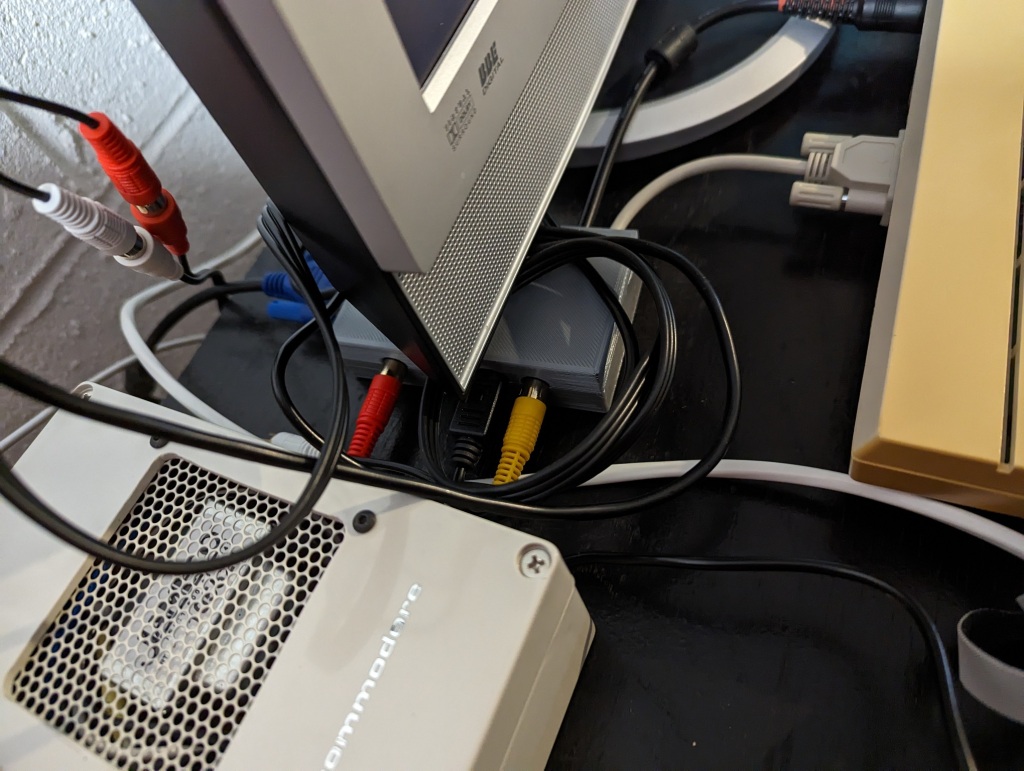
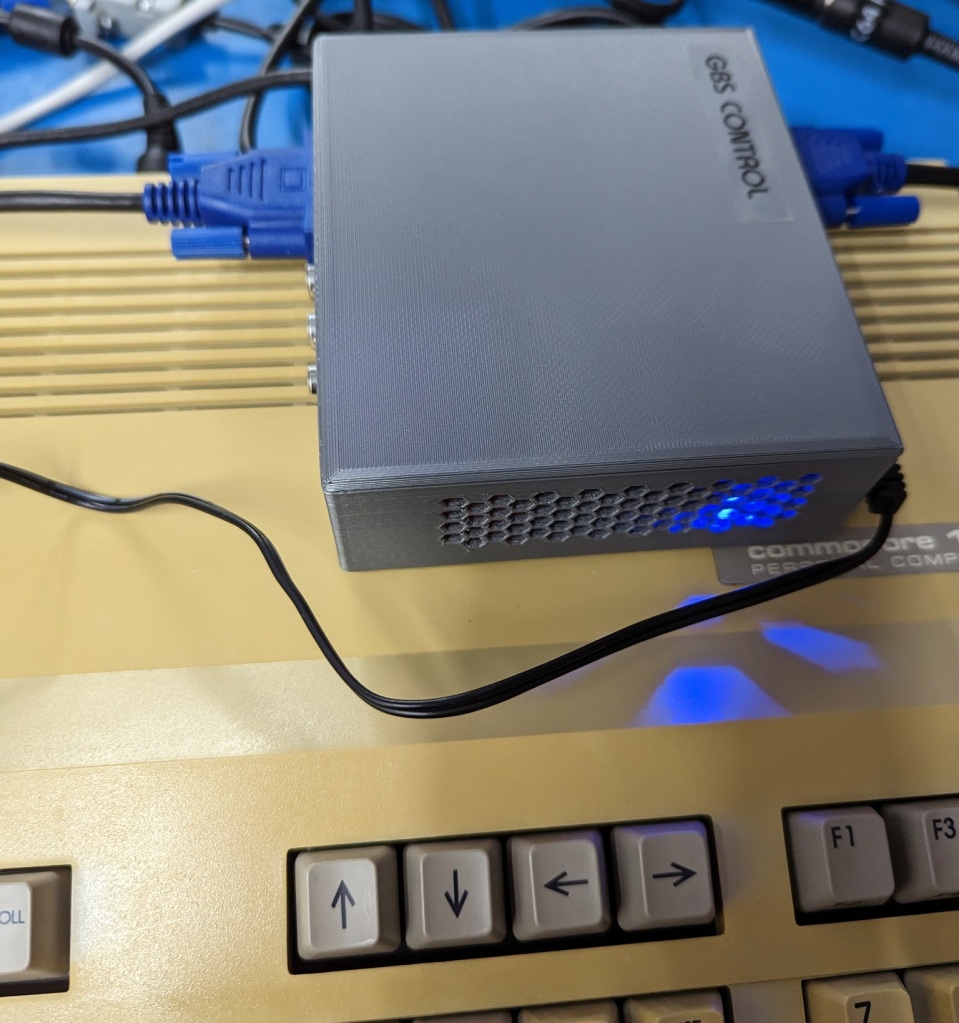
Here are a few pictures of the Commodore 128 setup. It is a bit crowded with projects, most of them have posts here on the blog. The Commodore 64 replacement Power Supply, a Commodore 64 to Commodore 128 Power Supply Adapter cable (I don’t have post about it, It takes the C64 power jack on once side and the Commodore 128 plug is from “Hey Birt!“. My C64 power supplies were built for higher current than the factory model making them able to handle the C128’s requirement fine. I used Drunk “n” Retro’s Diagram, which you can find many examples of diagrams to do so ). I do have the serviced Commodore 128 Power Supply, but it is easier to just swap in the adapter cable, than having both out on the desk. The Commodore 128 is connected to the Samsung 940MW TV I repaired. I of course have the RGBI Adapter tucked in under the monitor. I do have the Monochrome Composite 80 column connected up to the TV, as I was testing it. I also have the 40 Column SVideo connected to the TV. The RGBI Adapter is connected across to the GBS Control (silver box on the right under the pi1541 which is another project). Then the Commodore 128 which I serviced, but I guess I have no post on servicing it. I’m still debating painting it, I won’t be retrobrighting it.
Finally the gamepad project, which I don’t have a post about. It is far from flawless, the Dpad isn’t great. It has 2 buttons, the normal fire button on the left and “button 2” is either “Up” or wired to one of the Pot inputs. It also has an adjustable speed 555 based Rapid Fire option for the primary Fire button. I want to revisit that project, maybe then I’ll make a post about it.
I made up some labels for the two units I built up. Below you will see the original 2019 prototype with the new 2023 label. I made that label the same way as before. It was printed on plain inkjet paper. Then covered with adhesive laminate film and cut to size. In 2019 I masked off the “case” and sprayed adhesive spray onto the case. I then removed the masking and put the label on it. This time I tried the “easy way” of spraying the paper, as you can see it ended up with the obvious effect of the paper looking like it got something on it showing through. That is why I had originally sprayed the Case instead of the label. This was for testing, and I wasn’t completely happy with the label. I need to get new ink cartridges for my printer and then I may remake the label. The second picture shows the reduced build CGA Adapter’s label. This label was printed on a scrap of HP Adhesive Vinyl. The printer didn’t print quite right due to being out of black ink and the red cutting out too. This label does look better overall although it isn’t perfect. I did put a label for Audio In on the CGA label. It is possible to jumper across the outer two pins of the Audio Out jumper to send the “Audio Output” jack to the “Audio In” Pin on the HD15 port for use with the SCART to HDMI Adapter. All I would have to do is open the case and cut in a hole for the rca jack and install it to the board in the future if I wanted to. I don’t plan to do that currently though.
I think that pretty much wraps up this project. You can see the label on the box there now, and the 128 is running JiffyDOS now. I do have the SID Audio, Monochrome 80 Column Composite, 40 Column SVideo, and of course the RGB through the GBS Control into on the Samsung TV.
The v1.2 boards arrived today. They look good, short of some labels having been reset shortly before making the order that I want to fix. The biggest being the Commodore AV Port header is unlabeled.
I checked placement of all the parts, and I found one issue. ( Thought I found an issue, but I figured out later that the unmodified RCA Jack does “just fit”, it is just quite tight.)
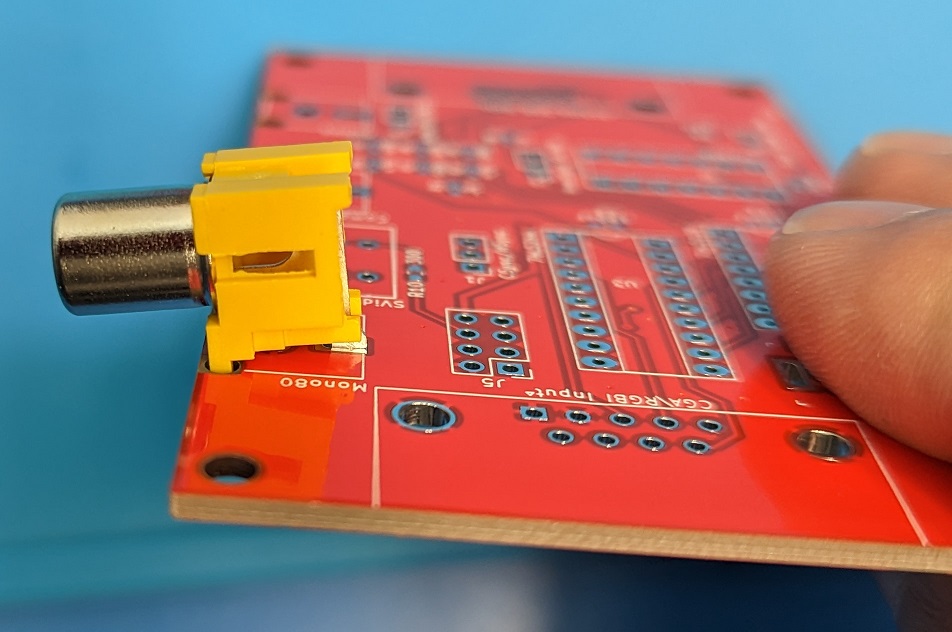
The RCA Jacks fit their footprint perfectly minus a bit of an issue with the back pin. The back pin is a little tight with the specific jacks I am using, which are made to the the correct footprint. I initially thought that they wouldn’t fit, so below you see I filed down the back pin a little to make it easier. But with working on it further, I found they do fit, it is just a little tight depending how you align the pin installing it. So you can either get them to fit, or to make it easier you can grind/file off that little bit of the pin.
With a quick touch up using the Dremel I made the Yellow jack fit nicely. I filed that little upper lip off. The jack doesn’t “have” to be filed down, but it might be a bit tight or if your jacks are a little different it they may require it.
I am making up two of the boards. The first one to replace my original adapter for the Commodore 128. That one will reuse the short Commodore AV Port DIN Cable and the short DB9 Cable from the original. The other board I am building up as a CGA adapter board, I am leaving off the Commodore AV Port parts (mostly) and adding the Barrel Jack for the 5V DC input. I don’t currently have any computers that use CGA, but I figured I have five boards and plenty of parts to put one together
.
The original adapter and the two new ones I am looking to assemble.
I salvaged the cables, ICs and one of the sockets from the original unit as I am scrapping it. I wouldn’t have messed with the IC Socket except I was practicing with my desoldering gun. It turns out I only ordered one VGA port, so I had to salvage one from an old monitor switcher board I have. I managed to get it off, and it is the same footprint as the new one. It wasn’t too easy, but went fine.
The two boards after soldering.
They turned out looking pretty good overall. The right board is the CGA board without the Commodore AV functions. It will take IBM CGA and a 5Volt DC Power adapter to make it into an Analog RGB signal with the CGA Brown Fix applied. That can go into a GBS Board, GBS Control modded board or something like a SCART to HDMI board. The primary limitation with the SCART to HDMI board (other than a lot of latency) is there would be no Audio on the SCART as CGA doesn’t have audio on the cable (for the Commodore 128 the Audio comes from the Commodore AV DIN Port). That and you need a Analog RGB to SCART cable, which my cable is a bit custom, see my cable pint out in the “original” project post from 2019.
The board is a perfect fit into the project box that I used for the original adapter. The openings are all different though, and you can not drop it in once the ports are soldered on. I guess you could “slot” in all the openings, but that leaves gaps from the top, which I don’t like. I plan to design a 3d printable case for the board. That is a part of the project that will have to wait until next weekend and likely longer though. I want to make it so it had all the required openings and is a simple split case that will fully enclose the board.
I do have to check that the boards are wired properly, mostly the Commodore 128 version with the cables. Then I will test the boards and see how it works. I will make the required corrections and changes on the pcb design and upload them to Github.
Above are some pictures of the testing. The Monochrome 80 Column pass through doesn’t work. I wasn’t thinking and passed it through the 74LS244 buffer, which it doesn’t work that way. The v1.3 board design no longer passes the Monochrome 80 Column video through the 74LS244. That is corrected on the v1.3 design I released on Github.
The rest of it works. RGBI works, 40 Column Commodore Composite pass through works. The 40 Column Commodore S-Video pass through and Audio via the RCA Port work properly. My Commodore 128 is being odd, I am not sure if it has something wrong with it, so it has limited my testing options. I did work on the C128 awhile ago, and it all appeared to be working except the cartridge port was being problematic. I haven’t been able to get it to work fully with the pi1541, although the 80column programs I tested are working through the pi1541. It may be because the pi1541 I am using is the 3A+, and the sdcard is setup for my 3B+ instead. I think there is a setting change required for timings.
The first image is through the GBS Control, with scan lines enabled. I have another post where I build GBS Control if you want to see that. The next being the adapter board connected up to the GBS Control. The second row starts with the SCART Converter to HDMI on the same color test. It is brighter due to no scan lines. Then the SCART Adapter connected up. The last picture was me testing an 80 column game using the GBS Control. I did find that the SCART Converter was not being stable when in a game though, it was flickering and blinking in and out. The GBS Control was stable on the same games. I am wondering if it is something with the sync signal. The one IC is a HC chip, which should be either an LS or HTC, that may be doing something to the signal that the SCART Adapter doesn’t like. I have another IC on the way. I’ll be testing the SCART to HDMI again when that comes in. I also did the bodge for the 80 Column Monochrome output and I will be testing that when I put the boards into their new 3d printed cases.
This is a follow up to an older project I did. The RGBI (RGB Digital) to RGBA (RGB Analog) for the Commodore 128 80 Column Video. Commodore’s RGBI is essentially the same as CGA so the adapter works on either. I made my prototype adapter back in 2019. I wanted a project to work on and wanted to work with KiCad to see how that went.
I had started making a PCB Design in Eagle back in 2019, but I never finished it. I didn’t want to keep using Eagle so I stopped working on it.
This project is the RGBI to RGBA project packaged into a custom PCB Design and with a few additions. Such as a dedicated 5V DC Power Jack for when using it with an IBM Based pc for CGA.
It still has all the Commodore functions and more passthrough functions now for the Commodore 128. The Commodore specific parts could be skipped though.
Below are some pictures of the PCB Design work in progress.
3/4/23 the finished v1.3. Is ready to download.
The board is sized to fit into the same case I used for the prototype. The problem with that is you can not get it into the case with the DB ports soldered on. I still laid it out for that size and the mounting holes to match that case. I have a couple of them yet. I think it would probably be better to design a 3d printed case. I can make it split at the place I need to get it in and out easily that way.
The board layout is basically a DB9 port on the left side for the RGBI/CGA input. Along the top the first port is for a single RCA Port for 80 Column Monochrome output from the Commodore 128’s RGBI Port. It is there, so I figured it is easy to include. You don’t need an “adapter” to use the Monochrome output, it is just Pin7 on the RGBI DB9 port on the back of the C128, I am passing it through the 74LS244 buffer though. The next footprint is a SVideo Port for from the Commodore 40 Column from the AV Port, including a 300 Ohm resistor on the Chroma line. The next port along the top is for another RCA Port and it is the Commodore 40 Column Composite Video from the AV Port. The last port along the top is a third RCA Port which is the Audio Output from the Commodore AV Port. There along the right side is the 15 Pin RGB Analog Output. The bottom left has the 5V DC Barrel Jack footprint (Center Positive). The Header pins are the C64 AV Port, it is oversized as I want to make it “keyed” with a missing pin and a plugged hole in the connector. The CSync/HSync is to set the Sync output for the normal HSync pin on the VGA port to either be Combined Sync (CSync) or to just pass through the HSync normally. The Audio header is a jumper to either output the Audio to the RCA Port above it when in the Left side or to output it on the VGA port on Pin10 for when I use it with the SCART to HDMI Converter box. InvertSync is another jumper to Invert the CSync/HSync line if needed. Finally the SCART Blanking is a jumper to enable sending VCC/5V to Pin9 on the VGA Port again this is for when I use the adapter with the SCART to HDMI Converter box, this enables the SCART RGB Detection on SCART Pin 16.
I think it is a reasonably sized board. If it was to be used for CGA with an IBM Computer then you can install the Power Jack, and omit the 3 RCA Ports, the Mini Din Svideo Port and the 10 Pin Header for the Commodore AV Port. If it is going to be used for a Commodore 128 RGBI, just build the whole thing minus the Power Jack. I think the only thing with the power Jack is that plugging it in while having the Commodore AV Port connected could end up very bad. I might think about that a bit more if the 3pin Barrel jack could be setup to bypass the AV Port power or something like that.
I did go with through hole for the ICs, headers and ports. I was thinking of going with dual footprints for the Resistors and Capacitors to allow either through hole or surface mount parts. The Surface Mount capacitors and Resistors are 0603 Imperial size parts. I have all the ICs already in DIP/DIL, and I want them in sockets for easy replacement if required.
I had to make the footprints for the RCA Jacks, and the SVideo Jack. The RCA Jacks should have square holes on the front corners. I couldn’t see how to make such cutouts. I figure that I may just have to shave the plastic a bit on the RCA Jacks.
The board as well as the original prototype build can do a combination of outputs depending on your needs.
The board in the fully configured mode outputs RGBS, Red, Green, Blue and Sync (CSync or Combined Sync) with custom Audio and SCART Blanking voltage on the HD15 port. This is what you use for a SCART Input. With the Audio to the RCA Port and the SCART Blanking disabled (may or may not be an issue if it is enabled) the GBS Control also takes RGBS input. The GBS Control might get confused due to VSync being included too on the HD15 all the time. With the SCART Cable the VSync pin is just not wired to anything.
If it is set to HSync with the jumper then it outputs RGBHV: Red, Green, Blue, HSync, and VSync. VSync is always on the HD15 port. The GBS Control takes RGBHV, and that is the setup I use with it.
It will also do RGBS with an Inverted Sync with the other jumper. I think did that variation because of something to do with the GBS boards at the time. I don’t remember what it was about though for sure.
The other two jumpers are specific for doing the RGBS with SCART, that puts Red, Green, Blue, Sync, Audio and 5V on the 15 Pin output. It is how I used this adapter until I build a GBS Control to go with it. The GBS boards weren’t as good for this use until the GBS Control project came out.
When using the adapter in RGBHV mode the 74LS86 is not required. The 74LS86 is just used to make the CSync by combining the HSync and VSync. It is also used to do the Inverted CSync if that is enabled (which it would also Invert the HSync technically if it was enabled while the other jumper was in the HSync position). If you look at the schematic you will see it is just bypassed. The 74LS244 is a buffer to protect the Computer video output. The 74LS138 handles the CGA Brown Fix.
I have received the parts I had on order and checked all the footprints. There was an issue with the DB9 port footprint that I had to fix. I also had a few adjustments to make to the Mini Din 4 for the SVideo port. I made changes for footprint corrections and some adjustments to labeling then put in an order for the v1.2 PCBs. I am going to build one to replace the one I made in 2019 for my Commodore 128 RGBI, as I want SVideo. I plan to scrap the prototype, reusing the short DB9 cable and the short Commodore AV Din cable I made for it. I also plan to build up a second one for IBM CGA without the Commodore AV Port related components. If the board tests out, I will post the KiCad project files and Gerber files on Github. Once I have the boards built up, I intend to design a case that can be 3d printed.
Update: 3/4/23 v1.3 I am correcting the schematic, the original one had the 80 Column Monochrome Video from the Commodore 128 RGBI port going through the 74LS244, and it shouldn’t be. I am also adding R11 as an option for a “Resistive Ground (RG)” on the Shell/Shield of the 15pin output port, it probably should have a 100 Ohm resistor between ground to help prevent potential Ground Loop issues. To prevent ground loops with the cable shield is generally recommended to only be “grounded” on one end, so you can put in the optional R11 or omit it. All of the other connectors have their shield to GND/Ground.
I ran into an issue with some old Commodore 64 Cartridge Roms that I purchased. I found 4 Rom chips with a single PCB for sale and purchased them. The PCB had a IC Socket on it to swap the chips around, all four chips worked on the board. I wanted to get them all usable again as full cartridges. I purchased some 3d printed cartridge shells at some point after that. There is also the issue that with the cartridge shells you can not use an IC Socket, it makes the chip sit too high to close the shell.
I decided to look around for some PCBs, but I couldn’t find any with the proper footprint for the original ROM ICs that have the 2364 pinout and not the pinout of the now commonly used 2764 27xxx EPROMs that the Modern PCB designs use.
I had not yet worked on any PCB designs. It is a lot of work to go from scratch for something like this if you aren’t familiar with it. The main issues are recreating the physical board in the right dimensions, the edge connector, as well as the proper size and placement of the hole to fit the case shells. With those in place it would not be too bad.
The original board after removing the socket and putting one of the ROMs on it.
I did find a project on Github with Eagle design files. I tried to start working on it, but just wasn’t getting it at the time. Part of my issue is I have four ROMs and one board already. I only needed three boards. I didn’t want to order in 5-10 PCBs to only ever end up using three of them. That would have been quite a waste. I expect to that I will not be getting any more 2364 pinout ROMs in the future.
It has been a good while since I put those chips in some ESD Foam for storage. I recently purchased some premade PCBs for other projects, which you can find the GAL PLA replacement post here which is one of the boards. Another of the boards I purchased was a 2364 to 2764 adapter board. The GAL PLA was so easy to put together as well as the 2364 adapter that I really wanted to get back to this project.
I looked around and had seen some of bwak’s stuff. I found his Versa64Cart over at Github.
It looked like a great candidate as it was available with the Eagle files. I haven’t used Kicad and the other project I found only had files for it. I wasn’t up to learning another program just for this project. Bwak’s design is also the most complete and has all required documentation.
The only thing I really had to do with bwak’s design was add the 2364 footprint beside the 27xx footprint and wire it up properly. I was careful and used the design for the 23 to 27 rom adapter as part of my reference.
I also did some other reading of cartridge schematics and reverse engineering the original PCB I had received with the ROMs. In the end I put on the 2364 footprint, I tried to use an existing Eagle Library that had it in it, but there was some issue with the footprint in it. That lead me to making a new footprint for it in the library using the standard DIL/DIP footprint. It is the oval pads rather than the minimal round ones that bwak used for his footprints though.
Here you see the 2364DIL24 added to bwak’s schematics
I also added a jumper between EXROM and IO2 to the board. The only reason I added that was because the Original PCB I have has them wired together. I have seen no other point at which those are referenced as being wired together. These specific ROMs are set for “GAME” and “ROMH”. EXROM is not used on these cartridges. I have found no reference of IO2 or IO1 used on any standard cartridges, maybe they are used for bank switching cartridges? If that jumper was connected AND “EXROM” was tied to ground, that would Ground IO2, which is probably not good. Beyond those changes the board is the same as bwak’s 1.5 design. This will let me use my remaining boards with some 27xx Eproms or EEproms.
In the end I ordered 5 boards from JLC PCB. You can see the IC2 and JP1 footprints below on the Gerber viewer.
The PCBs arrived 7 days from ordering them. That was manufactured, packed and shipped from China to the Eastern United States. They do say two weeks estimate, it was very impressive to get them so quickly. I got them for a bit under $20 for the five boards shipped to me.
Front and back of the board after it arrived.
If you look at my board compared to bwaks’s 1.5 the ground plane is different, I think I widened the gap between traces, as well as the additional footprint for the other socket is probably blocking some areas. The old boards had no ground plane it is not a big deal. I usually like to fill it out as much as possible though, for this it is not important.
Here is the first one I assembled beside the old board.
When they arrived I tested them against the original PCB. Everything checked out, the boards all looked correct with no defects. I did have to round over the card edge connector though, I expected that. I didn’t want the sharp edge there going into the C64. It was easy take the edge down with some sandpaper on a sanding block with a few passes across it.
The next thing I needed to do was solder on one of the ROMs, the capacitor and do the solder bridges for the GAME and ROMH pads. Initially it did not work, but that was because I forgot to do the GAME solder bridge. I did that and it worked perfectly. For the next three ROMs I soldered one onto the original board and prepared two more of the new boards for the last two. They all tested out and worked properly. The next thing was to put them into the 3d printed cartridge shells. That was easy enough, I will say compared to the old PCB, which fit perfectly into the printed shells that the new boards are slightly different. They are maybe .5mm to wide to fit, the hole for the screw must also be about .5mm to high or maybe even 1mm . This meant I had to slightly shave the 3d printed shell to fit the pcb into it, not a big deal. The hole placement means they are sticking slightly out of the bottom of the cartridge, but part of that is these cartridge’s have the screw about 1mm to low making that difference between the old board and the new ones a bit more pronounced. The old PCB even is about sticking out of these shells.
Showing the old PCB and the new one.Here are all fully soldered up and ready to close up.
I am working on modifying a 3d printed shell design for my remaining boards, as those are the only ones I had. I had purchased them specifically for use with these four Original ROMs. I do have an Ender 3 Pro and can print them myself now. There are a number of designs on Thingiverse and other sites. So I picked up a few designs and started tweaking them with Tinkercad. The primary design I started with is a Stumpy type, it perfectly fits that old factory PCB, but that is the tallest it will accept. That is fine with me. It looks cute and takes up a bit less space, is quicker to print and takes less material. The problem with it is that the screw hole is was not placed properly, and the diameter of the standoff is incorrect, is also lacks support to keep the cartridge from rocking back and forth along it. I worked on it to get the screw hole placement correct, as well as fix the other issues with the standoff. I had placement corrected, and the length of the pins was great, the problem being the shaft was too large.. why.. So back to working on it. I did get it downsized properly now. It will use a M3 screw, so I reworked the face to accept a threaded brass insert. If I used the brass insert I can use M2.5 screws as well. The revised case now prints well and fits the cartridge PCBs nice and securely in the proper location.
Here they are closed up with my second test print of the Stumpy shell
The short shell is going to be for the remaining boards and possibly a few other modern cartridges. The original cartridge board fits it perfectly and is the longest that will fit in it. The Versa64 board a bit shorter so they fit well. I was thinking of making an even shorter version, but then it may get to be difficult to remove from the computer. I am thinking of maybe making a post about the shell if I do something interesting with it. It does not have the removable nameplate, which it really can’t as the screw mount is on the back of it. The cool thing about the removable faceplate on the shells I ordered is that a custom plate can be made to put in them. I had also purchased a shell for my Dual C64 Diag/Dead Test Cartridge which as a customized nameplate and opening to make the switch accessible.
The last thing I did with these cartridges was print up some labels with my Brother PTouch Labeler.
I thought of doing some printed labels on my inkjet printer, but they tend to fade as well as smear the ink if they get wet/damp. I have also done reproduction labels for cartridges using either label paper with the clear packing tape over them to protect them. Those sometimes the adhesive fails but it does usually hold up, the problem is more likely the packing tape adhesive fails and it starts to come loose. I have done it with paper and spray adhesive, but then after a couple years the spray adhesive has failed and the labels started coming off. Maybe I didn’t use the right adhesive spray. I did use clear laminating tape, and that seems to hold up well and stay on the label, but due to the spray adhesive they haven’t been on that long. Also the laminating tape I used is not glossy and is slightly hazy. I have also recently used a matte finish inkjet printable vinyl (see the RAD REU Cart). I feel that should hold up well, it isn’t quite the finish I like though it is durable. I mean the vinyl won’t have the exact look of an original cartridge label.
The PTouch labels have nice gloss finish and they stick very well. I expect them to hold up well. I have used them up for years for various projects as well as for work. They look nice for what they are, but are rather limited in the “art” and styles available.
You can see they aren’t any high value Cartridges. My projects are often about learning to do something new, or get better at some things I have done in the past. I like the bonus of getting something useful in the end. I may not use these games often, but I am glad that it will be easy to do so now. You can see how close the PCB is to the cartridge’s shell. Radar Rat Race is actually the original pcb, and even it is sticking out a bit. If I cared, I could sand down the new PCBs a bit shorter to be a more proper fit, but I don’t care that much. The new modified shells I have been working on are modified to fit better as they are.
This is just another quick easy project that I did. It is so much easier to put together a project with a proper PCB. I had toyed with the idea of designing and etching the boards myself. The ones I make were a very delicate and complicated project. I really don’t want to do any more of them anytime soon. Being a double sided board makes that much more particular in alignment. Cutting the boards correctly, drilling, etching… It is a lot of work, the lack of solder mask and through holes make it far more complex to assemble (not to mention not having the cartridge edge connector plated properly). I also design the boards with more space between traces when etching the boards myself to allow for the difficulty of keeping them intact and getting them to separate properly during the etching process , as well as going with as few through holes as possible.
I certainly expect to look into getting PCBs manufactured for future projects where required. The tough thing is for one off projects they are rather wasteful. I don’t want to buy 5 of them and only ever use one. Prototypes often end up with some mistakes, so I might order 5 and not be able to use any, or use one of them and have to rework on the board making it a bit of a mess.
Just a little addition. Here is a further modification of the Stumpy Shell shown above. The PCB is nice and flush in the shell. This is a C128 Dual Diag cart I have made up with one of the spare PCBs using an EPROM. The switch insert makes it reachable from the outside and the little red reset button extension makes it accessible. The EPROM is in a socket for this cartridge so I needed to make an opening for it. I find it quite difficult to get proper measurements for making the openings. There is a bit of trial and error making some test prints. An easier way may be to export the pcb design either to a scaled image file to use for a background or export it as a 3d model, which I did for my RGBI to RGB adapter pcb when making the case for it.